
ClearMatch /
Every invoice. Every exception. In view.
Match invoices against purchase orders and received quantities before an owner approves the exact revision.
- Practice
- AI & automation
- Built by
- Lumia Digital
- Application
- Independent source & workspace
- Current release
- Local / September 2026
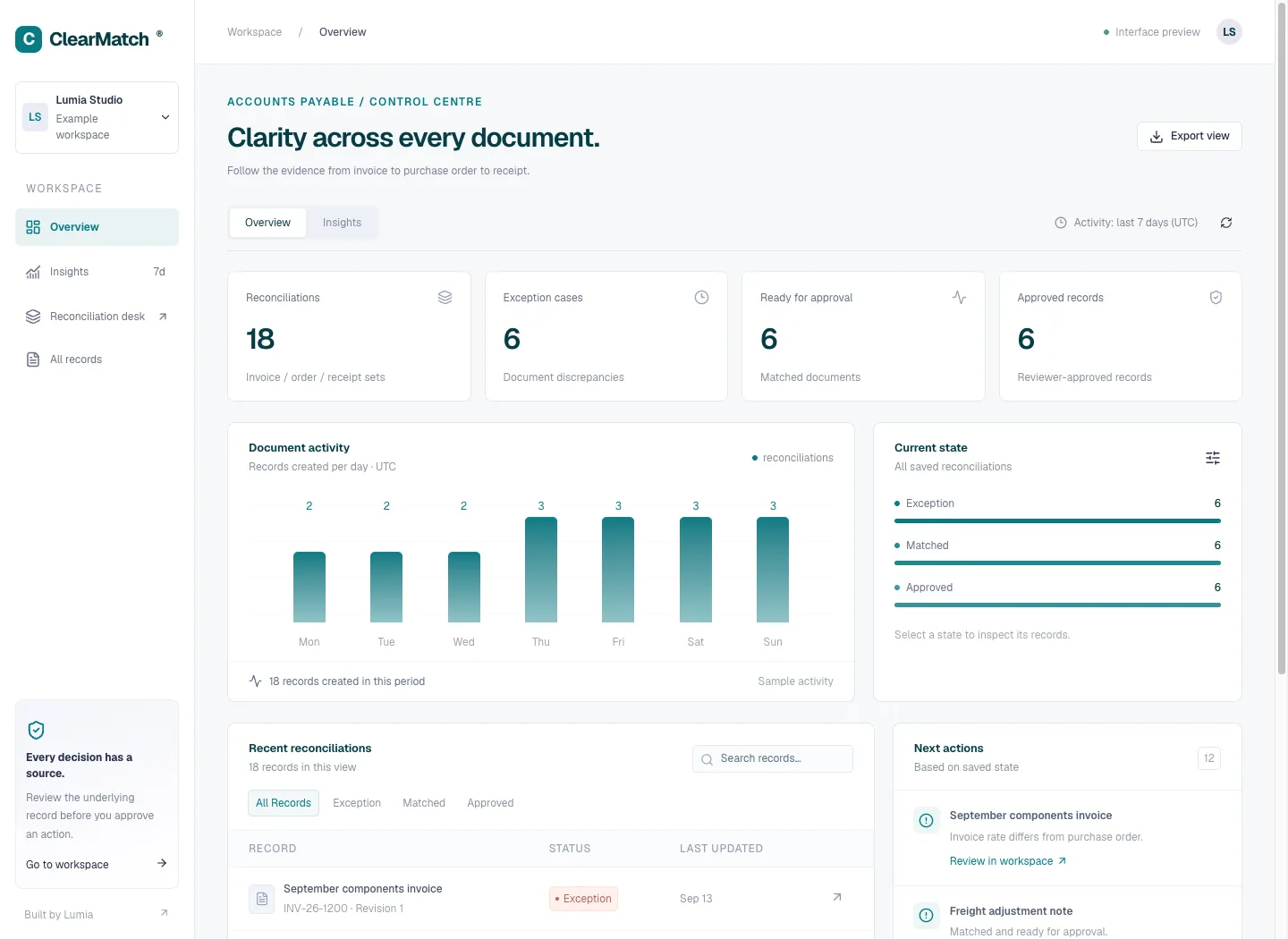
Evidence, organised around the exception.
A teal accounts-payable control centre brings reconciliation states, recent documents and reviewer actions into one overview, with a dedicated insights view.
PDF.js evidence viewerSee how ClearMatch thinks.
Every Lumia system earns its own operating language. This view shows the decision surface, evidence trail and human checkpoint built around this workflow.
Interface study / controlled local workspace / human review remains in the loop.
The problem worth solving.
An invoice can add up correctly and still disagree with what was ordered or received. A reviewer needs to compare quantities, prices and receipt evidence before deciding whether an invoice should proceed. Doing that comparison as an unstructured explanation makes it difficult to distinguish a mathematical match from a missing delivery, an unapproved rate or an invoice submitted twice.
ClearMatch treats the invoice, purchase order and goods receipts as separate inputs to one explicit reconciliation. It calculates exact totals, compares line facts and records named exceptions. A partial receipt does not become a clean match simply because the declared total looks plausible. The owner can approve only when the current record has no unresolved exceptions, and later edits invalidate the prior review.
The application is an independent Lumia implementation tested with synthetic documents and a deliberately short receipt. Its intended audience is an operations or accounts-payable reviewer who needs a traceable local decision before an external accounting step. It does not claim to pay suppliers, post accounting entries or replace a company's commercial controls. The case demonstrates how explicit rules and source review can work alongside optional extraction without delegating payment authority to a model.
Designed for: Accounts-payable and purchasing operators reconciling SKU-based invoices against a purchase order and one or more goods receipts.
From input to a useful result.
Assemble the three sources
Start with the invoice reference and supplier identity, its currency and tax input, the purchase order and the goods receipts. Retain relevant source attachments where available. Check whether a receipt is genuinely distinct before adding it; repeating the same receipt reference would otherwise overstate what arrived. Work from authoritative records, not guessed identifiers.
Review extracted facts before matching
Optional structured extraction can suggest fields from authorized document text. Compare each quantity, price, total and source quotation with its document. Complete unknown supplier or reference fields from your records. The model's suggestion is input for review; it does not certify an invoice, infer an absent delivery or decide that a discrepancy is acceptable.
Resolve the named differences
Create the reconciliation and inspect its exception list. A price mismatch, unordered item, excessive ordered quantity, receipt shortfall or declared-total difference needs a specific correction or source clarification. Update the record when the underlying information is resolved. Do not increase receipt quantities merely to make the status green; keep the original commercial evidence accountable.
Approve the current result
Review the matched totals and current digest, then have the owner approve that version. Export the PDF or CSV with its saved state, source references and exceptions for your next accounting step. If new information changes the record, review again. Approval inside ClearMatch does not initiate payment or create an external payable entry.
What the software actually did.
These results come from internal workflow testing of the local product. The records are controlled test inputs; customer deployments and commercial impact have not been measured.
An exact matched fixture
Eleven ClearMatch HTTP checks passed. The primary fixture reconciled three units at 1001 minor units each,1800 tax basis points and a declared total of3544. With matching purchase-order prices and receipts, the result contained no exceptions and owner approval succeeded. The test independently calculated the expected subtotal, tax and total rather than copying a displayed answer.
Exceptions remain actionable
Reducing the received quantity from three to one produced RECEIPT_SHORTFALL and blocked approval. Changing the declared total from 3544 to 3543 produced TOTAL_MISMATCH. Reusing the same supplier invoice could not become a second ordinary payable. These observations verify the defined scenarios, not every form of duplicate invoice or disagreement a real supplier could introduce.
Extraction preserves an unknown
One authorized synthetic invoice extraction completed through Gemini 3.1 Flash-Lite. It retained the invoice reference, INR currency, quantity 3, price 1001, tax 1800 and declared total 3544. The supplier identity, absent from the text, remained null with a clarification question. A verbatim source quotation was checked against the fixture instead of accepting unsupported generated evidence.
Make the boundary clear.
- This matching model supports unique SKUs within each document, whole quantities, two-decimal INR/USD/EUR/GBP and one invoice-level tax input.
- It checks submitted facts; it does not authenticate a supplier, prove delivery or determine that a price change is commercially authorized.
- Duplicate protection uses the provided supplier identifier and invoice reference. It is not fuzzy duplicate detection across arbitrary names, scans or external ledgers.
- An approved reconciliation is a local review record. No bank transfer, payment-provider operation or accounting-system post was executed.
- The evidence listed here is primarily HTTP and one synthetic model extraction; it must not be presented as a completed full browser or production rollout audit.
Questions before you start.
Will ClearMatch pay an approved invoice?
No. The verified application records a reviewed reconciliation and exports evidence. Payment and accounting posting remain outside the implemented local workflow.
What happens when only part of the order arrived?
If the invoice quantity exceeds the received quantity, the matching rule raises RECEIPT_SHORTFALL and approval is blocked. Correct or clarify the underlying delivery information rather than treating the invoice as fully received.
Can I approve despite a total mismatch?
The current approval handler requires an empty exception list. Update the source data through the normal versioned flow and review the recalculated result before approval.
Does AI choose the supplier or approve the result?
No. The recorded synthetic extraction left an absent supplier identity unknown. The operator supplies authoritative identity information and an owner approves the current matched record.